Agent CLI Blueprint
An agent-driven repo that gives an LLM safe, scripted hands across
API, UI, and CLI —
stable core in scripts/, your customizable agent layer in skill/.
One blueprint, two lifecycles
1 · For AI agents
After humans push the product repo, every agent session inherits the same committed layer — no re-explaining the product from scratch.
blueprint.config.yaml, skill/, and committed templates — Cursor, Claude Code, CI, many workers.
2 · For humans
Product owners and teams shape what gets committed; each person keeps local secrets and envs gitignored.
Shared: config + skill/ flows. Local: envs/, secrets.yaml, wiki, runs.
See the CLI flow
Recorded on a reference fork of blueprint-cli. Terminal autoplays — no player controls. PII masked in casts.


Feature map
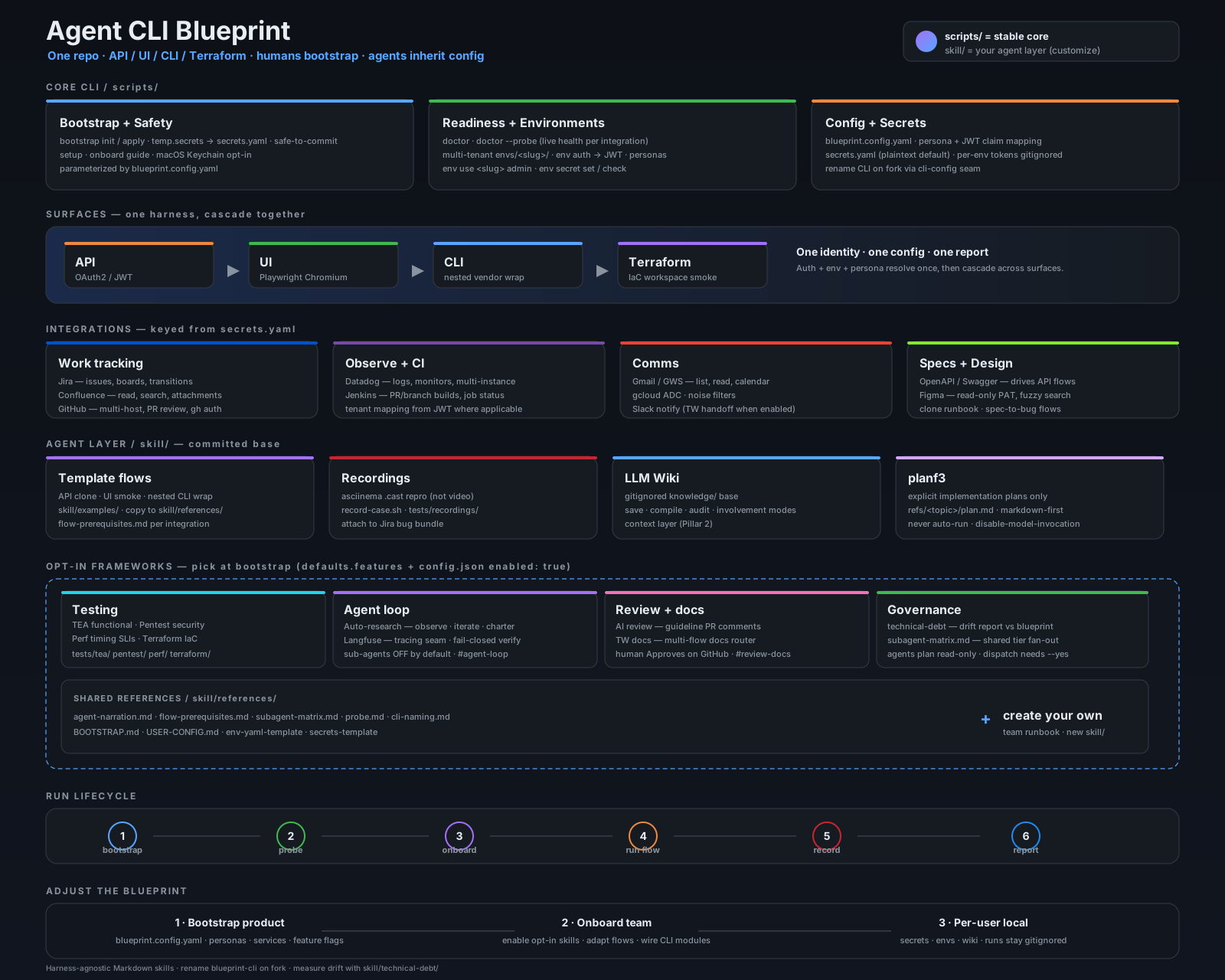
scripts/ = stable core (bootstrap, doctor, envs). skill/ = agent layer: committed base (flows, recordings, wiki, planf3) plus opt-in frameworks at bootstrap — testing (TEA, pentest, perf), agent loop (auto-research, Langfuse), review & docs (AI review, TW), and governance (technical-debt, subagent matrix). See anchors: Testing · Agent loop · Review & docs.
Nine pillars — what to keep aligned
When you fork this blueprint into a product repo, drift is measured against these layers. The technical-debt skill runs a read-only report + HTML with copy-paste agent prompts. Full guide: BLUEPRINT-DEV.md.
Skills / scripts separation
Product in skill/; technical in scripts/lib/. blueprint-config.mjs exposes cliName() — never hardcode product strings in core.
Context layer
LLM wiki (knowledge/, gitignored) + skill/llm-wiki/. Source-first, append-only. Examples skill for onboarding.
Service layer
Auth, scripts, skills are replaceable. Registry pattern, low complexity — stands the test of time.
Security
Secrets gitignored; keyring opt-in; agents know good vs bad. BOOTSTRAP.md lists never-commit paths.
Shared workshop
Humans and agents use the same repo, tools, auth — human stays accountable (bootstrap, doctor, write gates).
Conventions & guardrails
SMART-PROMPT.md, CODING-PLAN.md, PLANNED-LAYOUT.md, cli-naming.md — the anti-drift spec.
Reusable templates
env-yaml-template.md, secrets-template.md — fill-in scaffolding, not copy-paste.
Diagnosability
doctor --probe + per-service probes. Optional Langfuse + auto-research for fail-closed trace verification.
Dev when you fork
Fork & rename
Edit blueprint.config.yaml. Follow skill/references/cli-naming.md and PLANNED-LAYOUT.md before adding folders.
Bootstrap
bootstrap init/apply → doctor --probe. Secrets stay gitignored; optional Keychain on macOS.
Customize skill/ (commit)
Product flows and runbooks in skill/. Keep scripts/ technical — product identity via config seam only.
Measure drift
node skill/technical-debt/scripts/drift-check.mjs — HTML report vs this blueprint. Use report prompts to ground your agent rules file.
Testing framework examples
Three general, opt-in testing layers in skill/ — plus an optional
Terraform IaC surface (fourth test surface alongside API, UI, nested CLI).
Pick any during
bootstrap / onboarding. All ship lean template catalogs;
your fork extends cases and wires the CLI runner. Plan layer:
test-plan-template.md
· results:
results-schema.md.
TEA
Test Architect layer — pass/fail coverage for API, UI, and nested CLI surfaces.
tea list→tea run <ID>→tea report- Catalog:
skill/tea/references/example-catalog.json - Results:
tests/tea/<CASE_ID>/ - Enable:
tea_testinginblueprint.config.yaml
Pentest
Passive-first security probes — OWASP API Top 10 framing. Sibling to TEA; findings, not functional regression.
pentest list→pentest run <ID>→pentest report- Catalog:
skill/pentest/catalogs/example-catalog.json - Results:
tests/pentest/<CASE_ID>/ - Active probes:
--yes· Enable:pentestfeature flag
Perf
Single-user latency probes — p50/p95 against API, UI, and nested CLI surfaces. Not multi-VU load.
perf list→perf run <ID> --reps N→perf report- Catalog:
skill/perf/catalogs/example-catalog.json - Results:
tests/perf/<CASE_ID>/· serve port 8774 - Enable:
perf_testingfeature flag
Terraform
Optional fourth surface — registry doc lookup + workspace plan/apply smoke. No provider shipped in the blueprint clone.
terraform probe→list→get <slug>- Workspaces:
tests/terraform/workspaces/ - Fill
skill/terraform/config.json→provider.*at onboarding - Enable:
terraform_iacfeature flag
Off by default. During onboarding, ask whether to enable functional (TEA), security (pentest), timing (perf), and/or IaC (terraform).
Uncomment tea_testing / pentest / perf_testing / terraform_iac under defaults.features in
blueprint.config.yaml and set enabled: true in each skill's config.json.
Aligned with Pillar 9 (reproducibility).
For implementation plans (separate from test runs), see
planf3.
Observability-driven hardening
Two general, opt-in layers in skill/ — pick one or both during
bootstrap / onboarding. Lean templates only; your fork wires the
CLI runner and Langfuse keys. Example charter:
example-charter.md.
Auto-research
Interview-driven loop — trace a CLI flow, validate with a human, iterate, charter goals, HTML report.
research start→run→observe→iterate→charter→report- Work dir:
.research/<slug>/ - Sub-agents: OFF by default (
agents dispatch --yesonly) - Enable:
auto_researchinblueprint.config.yaml
Langfuse
Gated workflow traces via services.langfuse — status, probe, demo-session. Fail-closed verification for auto-research.
langfuse status→langfuse probe→demo-session- Keys:
secrets.yaml→services.langfuse - Toggles:
trace_workflows,trace_tool_calls - Enable:
langfusefeature flag
Off by default. During onboarding, ask whether to enable auto-research (workflow hardening) and/or Langfuse (tracing).
Uncomment auto_research / langfuse under defaults.features in
blueprint.config.yaml and set enabled: true in each skill's config.json.
Aligned with Pillar 3 (replaceable observability) and
Pillar 8 (fail-closed diagnosability).
AI review and TW pipelines
Two general, opt-in layers in skill/ — pick one or both during
bootstrap / onboarding. Large workloads can use the shared
subagent tier matrix
(fan-out off by default).
AI review
Guideline-driven PR comments — collect diff, agent writes review-output.json, validate, publish.
review collect→prepare→ agent →validate→publish- Guidelines:
skill/review-pr/references/guidelines.csv - Work dir:
.review/<slug>/ - Enable:
ai_reviewfeature flag
TW docs
Multi-flow TW pipelines — read-only prep, human comments + GitHub Approve. Sibling to AI review.
tw --list→tw --flow <id> --pr <url>- Flows: new-page, old-vs-new, error-codes, swagger, terraform, …
- Work dir:
.tw-docs/<flow>/<slug>/ - Enable:
tw_docsfeature flag
Off by default. During onboarding, ask whether to enable AI review (dev code review) and/or TW docs (documentation review).
Uncomment ai_review / tw_docs under defaults.features in
blueprint.config.yaml and set enabled: true in each skill's config.json.
Aligned with Pillar 2 (context/docs),
Pillar 4 (security review), and
Pillar 9 (reproducible flow registry).
What you get
Bootstrap & safety, readiness probes, multi-tenant environments, configurable personas, and one config + secrets layer.
One identity, one config, one report — the same flow runs across API (OAuth2/JWT), UI (Playwright) and nested vendor CLIs.
Jira, Confluence, Datadog, GitHub, Figma, Jenkins, Gmail and OpenAPI/Swagger — all keyed from secrets.yaml.
Template flows, Asciinema repro, a gitignored LLM wiki, and structured test results. See testing framework examples (TEA + pentest + perf), agent loop (auto-research + Langfuse), review & docs (AI review + TW), shared subagent matrix, and planf3 for explicit implementation plans.
Quick start
Clone, install the CLI, bootstrap your product, then probe integrations.
git clone <your-fork-url>
cd agent-cli-blueprint && npm run cli:install
# fill in your product + services
$EDITOR blueprint.config.yaml
# stage secrets, then promote
cp temp.secrets.yaml.example temp.secrets.yaml
blueprint-cli bootstrap apply
# verify everything is wired
blueprint-cli doctor --probe
macOS users can keep CLI-wide tokens in Keychain instead of plaintext: blueprint-cli secrets keyring enable
Adjust the blueprint — make it yours
Human lifecycle in practice — what to edit at each stage before agents inherit the repo.
Bootstrap your product
Edit blueprint.config.yaml: CLI name, identity host, personas, JWT claims and service defaults.
Onboard = team customization
Adapt the skill/ flows and runbooks to how your team actually works, then commit and push.
Gitignored = per worker
Secrets, environments, runs and the knowledge wiki stay local — each human or agent session customizes without polluting the shared repo.